Choose a program.
Select the session program from MBODY. The controller and connected garment form the physical side of the system.
MBODY / iOS and Android
MBODY brings program selection and individual zone settings to the 2011 system. MBODY has no membership feature. For your brand, a dedicated app can include your UI, functions and membership requirements.
2011 controller connection over Bluetooth
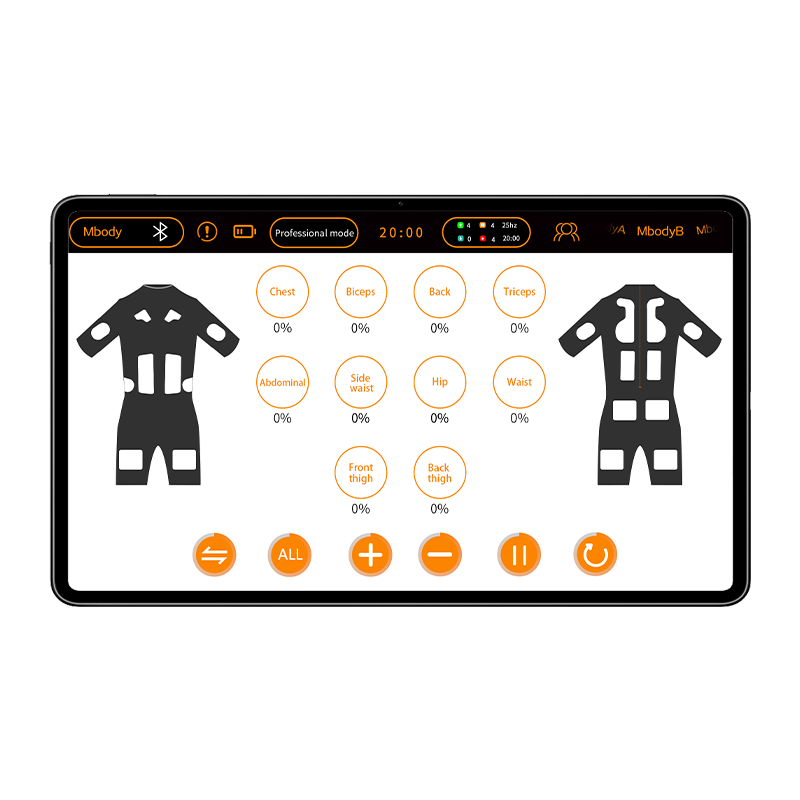
01 / The control experience
The app connects the program and its settings with the electrode layout of the garment in use.
Select the session program from MBODY. The controller and connected garment form the physical side of the system.
Adjust individual garment zones from 0 to 100%. Zone controls are shown beside the front and back garment diagrams.
The interface brings the session timer, program and intensity controls into the same view.
02 / Connect and control
The 2011 controller connects at the garment side and communicates with the app over Bluetooth.
Explore the 2011 garment collectionWear the garment, connect the 2011 controller and connect MBODY over Bluetooth.
Select the program and session settings in MBODY.
Use the individual zone controls to set the intensity for the connected garment.
Define the UI, functions and membership requirements together with the garment and controller you plan to offer.
03 / Dedicated app development
Provide your UI and functional requirements. We develop the UI and function design with you, then release the dedicated app.
Garments plus controllers, for dedicated app customization.
Discuss custom development fees with our sales team. General product minimum quantities and lead times are quoted by model and project.
See the development processShare your logo, visual direction, interface references and the screens your product needs.
Describe the intended user flow, program controls and functions you want to discuss.
Explain how membership should work in your dedicated app so it can be included in the development scope.
Name the garment and controller configuration, target platforms and estimated number of sets.
04 / Prepare your inquiry
A short, specific brief gives us the information needed to discuss the app and the physical product together.
05 / App questions
Platforms, control functions and the starting point for a dedicated app.
MBODY supports iOS and Android and connects to the 2011 controller over Bluetooth.
Yes. MBODY provides individual zone intensity settings from 0 to 100% for the connected garment.
No. MBODY has no membership feature. A dedicated customer app can include membership functions as part of its development scope.
Yes. A dedicated app can be developed around your UI, functions and membership requirements. Discuss the development fees with our sales team.
Dedicated app customization starts at 100 sets of garments plus controllers. General product minimum quantities and lead times are quoted by model and project.
Only the 2011 controller uses MBODY. The wired 902 controller and compact wireless 2105C controller operate without an app.
Include your company, garment or product, estimated quantity, target platforms, brand assets, UI references, required functions and membership requirements.
Share the garment, quantity, UI and functions you have in mind. We can discuss the dedicated app alongside the controller and garment.